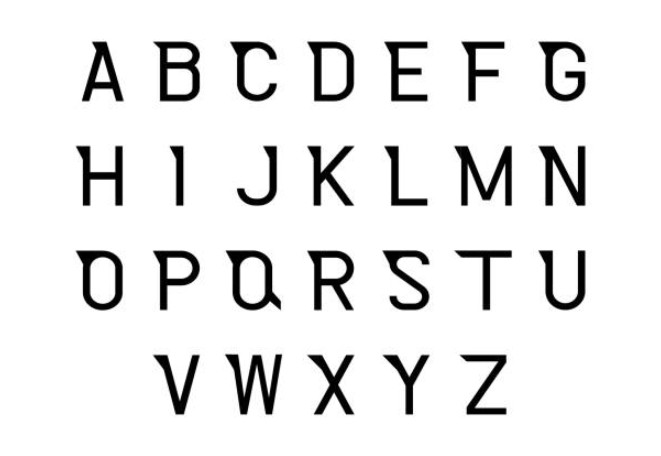
The Business of Type: How to Create and Sell Your First Font
Fonts are more than visual elements; they are scalable digital products that shape brand identity and generate recurring income.
If you want to create and sell fonts, you need a structured process, the right tools, and a clear monetization strategy.
This guide covers everything from design fundamentals to selling and scaling your font business.
What Is a Font Design Business?
A font design business involves creating custom typefaces and selling them as digital files (OTF, TTF, WOFF). Designers distribute fonts through marketplaces, personal websites, or licensing deals.
Fonts are used in:
- Branding and logos
- Websites and UI design
- Packaging and advertising
- Social media content
Why Selling Fonts Is a Profitable Digital Product
Selling fonts is profitable because they are scalable digital products. You create them once and sell them repeatedly with no inventory or shipping costs.
- One-time creation → unlimited sales
- High demand across industries
- No inventory or shipping
- Passive income potential
Many designers combine fonts with other skills, like graphic design, to increase income streams.
How to Create a Font (Step-by-Step)
Creating a font involves designing letterforms and converting them into usable digital files.
Starting from sketching core characters like A, O, and n to define style and proportion to export your font in formats like OTF or TTF.
1. Study Fonts in Real Use
Analyze typography in:
- Logos and branding systems.
- Websites and mobile apps.
- Packaging and editorial design.
2. Define Your Font Concept
Ask:
- Who is the target user?
- What style does it represent? (modern, serif, handwritten, etc.)
- What problem does it solve?
Example: A bold sans-serif for startups vs a script font for wedding branding.
3. Sketch Core Letters
Start with:
- A, E, H (structure).
- o, n, s (curves and rhythm).
These determine:
- Proportion.
- Stroke contrast.
- Visual consistency.
4. Digitize Using Font Software
| Tool | Best For | Level |
| Glyphs | Mac users | Beginner–Pro |
| FontLab | Full control | Advanced |
| RoboFont | Custom workflows | Advanced |
| BirdFont | Free option | Beginner |
5. Fix Spacing and Kerning
Poor spacing ruins even great designs.
Focus on:
- Letter spacing (tracking).
- Pair spacing (kerning).
- Word balance.
6. Expand Your Character Set
Minimum:
- Uppercase & lowercase.
- Numbers & punctuation.
Professional upgrade:
- Multilingual characters.
- Ligatures (fi, fl).
- Alternates.
- Multiple weights.
7. Test Your Font in Real Designs
Apply your font to:
- Logos.
- Posters.
- Website headers.
- Social media.
This improves:
- Readability.
- Visual balance.
- Market appeal.
Best Tools for Font Creation
Choosing the right tool depends on your skill level and design goals.
- Glyphs (industry favorite for indie designers).
- FontLab (enterprise-level control).
- Adobe Illustrator (vector prep).
How to Sell Fonts Online
To sell fonts online, create a high-quality typeface using tools like Glyphs or FontLab, then export it in formats such as OTF or TTF.
List your font on marketplaces like Creative Market, MyFonts, or Etsy with strong previews and clear licensing options.
Price your font based on style and usage, and promote it through platforms like Pinterest and Instagram to attract buyers and generate consistent sales.
Best Platforms to Sell Fonts
| Platform | Pros | Fees |
| Creative Market | Large audience | ~40% |
| MyFonts | High visibility | ~50% |
| Fontspring | Professional buyers | ~30% |
| Etsy | Beginner-friendly | Listing fees |
| Gumroad | Full control | Low fees |
Create a High-Converting Product Page
It includes:
- Font previews (real-world mockups).
- Full character map.
- Style description.
- Use-case examples.
Font Licensing Explained (Critical for Revenue)
Understanding licensing increases earnings significantly.
Common License Types:
| License Type | Usage |
| Personal License | Non-commercial use |
| Commercial License | Business use |
| Webfont License | Website embedding |
| App/Game License | Software/app usage |
| Extended License | Large-scale commercial use |
How Much Money Can You Make Selling Fonts?
Earnings depend on quality, niche, and marketing.
| Level | Monthly Income |
| Beginner | $50–$500 |
| Intermediate | $500–$2,000 |
| Advanced Sellers | $2,000–$10,000+ |
How to Market Your Fonts
To market your fonts effectively, focus on visual platforms like Instagram, Pinterest, and Behance to showcase real design use cases. Create high-quality previews, offer free versions to attract attention, and list your fonts on marketplaces.
1. Visual Platforms
- Instagram (typography posts).
- Pinterest (high traffic driver).
- Behance & Dribbble (portfolio exposure).
2. Build a Portfolio Website
Show:
- Font collections.
- Use-case examples.
- Download links.
3. Offer Free Fonts
The free fonts version helps:
- Build an audience.
- Generate backlinks.
- Increase discoverability.
Common Mistakes to Avoid
When creating and selling fonts, avoid poor spacing and kerning, inconsistent letter design, and unclear licensing terms. Many beginners also fail to create strong preview images or test fonts in real-world designs. Copying existing fonts and ignoring usability can limit sales and credibility.
- Poor kerning and spacing.
- Inconsistent character style.
- Weak previews (no mockups).
- No licensing clarity.
- Copying existing fonts.
Pro Tips from Font Designers
Start with a single font style and focus on usability over decoration. Prioritize spacing and kerning, as they impact readability more than letter design. Test your font in real-world designs like logos and websites before launch.
- Start with one style, not a full family.
- Focus on usability over decoration.
- Test fonts in real-world scenarios.
- Improve after launch using feedback.
Final Thoughts
Creating and selling fonts is a practical way to turn design skills into a scalable business. With the right concept, careful execution, and strong presentation, your first font can become a long-term digital asset.